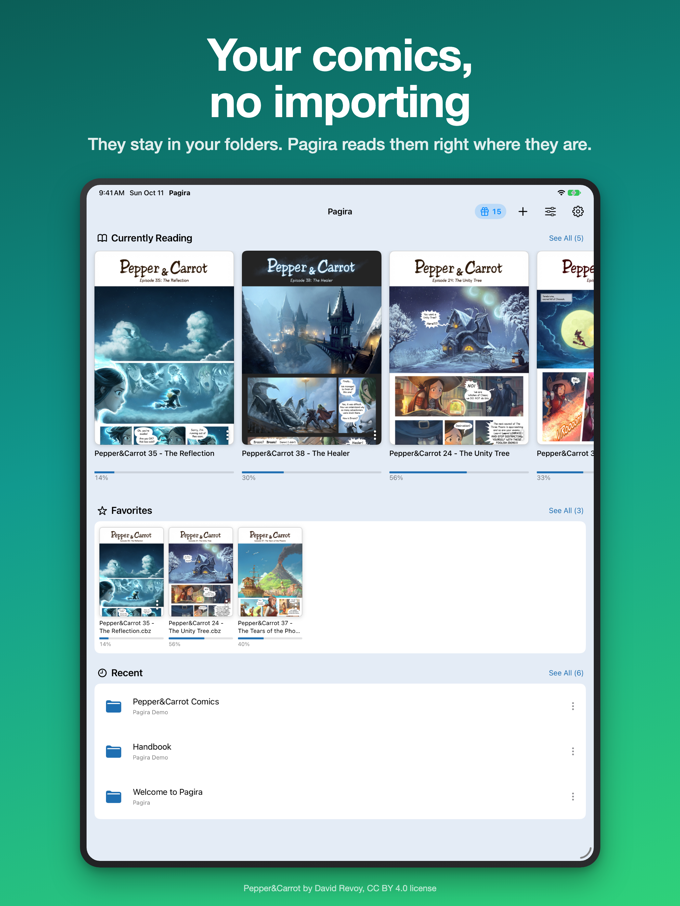
A document you read over several days is not one you want to hunt down every time: find the folder, work your way back down the tree, wonder which page you stopped at.
Pagira's Home is made for that. Open it and what you were reading is right there.
Currently Reading
The books, comics and PDFs you have started come first, with their cover and your progress. One tap and you pick up at the page where you stopped.
Favorites, with no copy
Add a document to your favorites in one tap. It is neither copied nor moved: it stays where it is, in its folder, and the favorite takes you back to it. Nothing to file away, nothing duplicated.
Recent and Offline
Below your favorites come the documents and folders you opened recently, then what you have downloaded for offline reading. “See All”, next to Recent, opens the full history.
On iPhone as on iPad
With iCloud, your favorites stored in iCloud Drive and the page you are on follow you from one device to the other: Home on the iPhone shows the book you were reading on the iPad.
What about the reading list?
Favorites replace the reading list of version 2.0. When you update, every item is carried over: it becomes a favorite on its original document when that document is found, and the copies the list kept are put in a “Former Reading List” folder, in iCloud Drive › Pagira. Nothing is deleted: you do the sorting.