
Your courses, manuals and reports
finally readable on iPhone and iPad

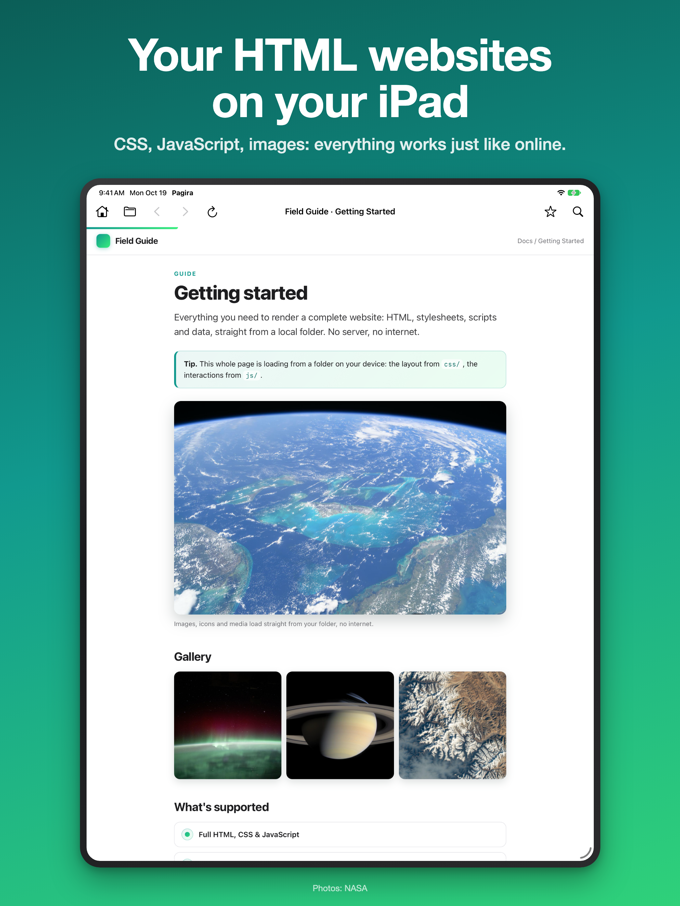
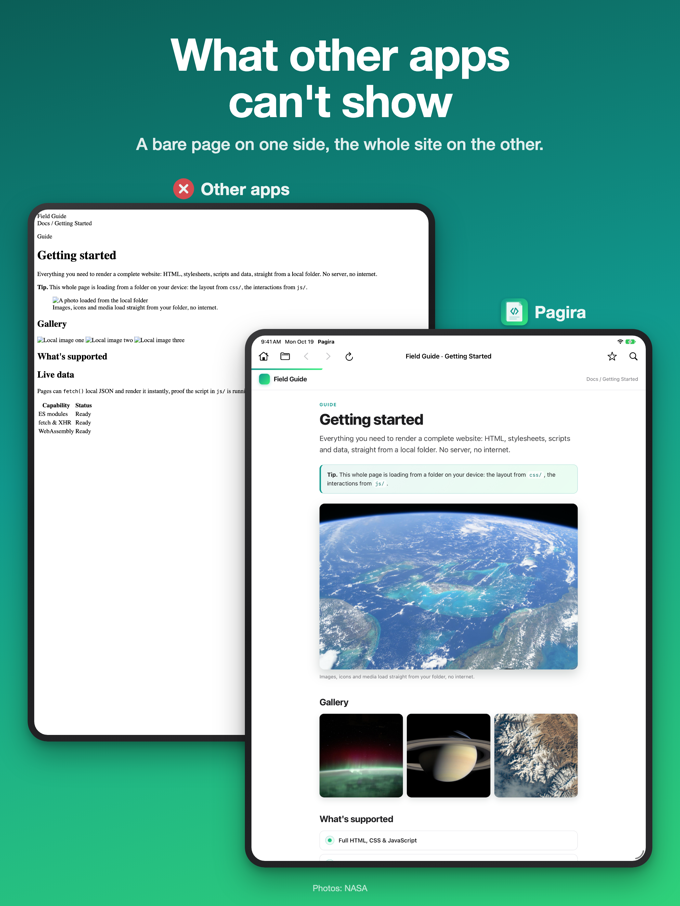
Courses, service manuals, documentation, reports: when a document arrives as a folder of linked pages, iOS has no way to open it. Pagira shows the whole thing, with its layout, its images and its links working, offline. Your PDFs too.

Pagira showing a complete documentation set on iPad

A real reader for the documents people hand you as a folder

Complete HTML folders and PDFs, rendered with their layout - online or off.

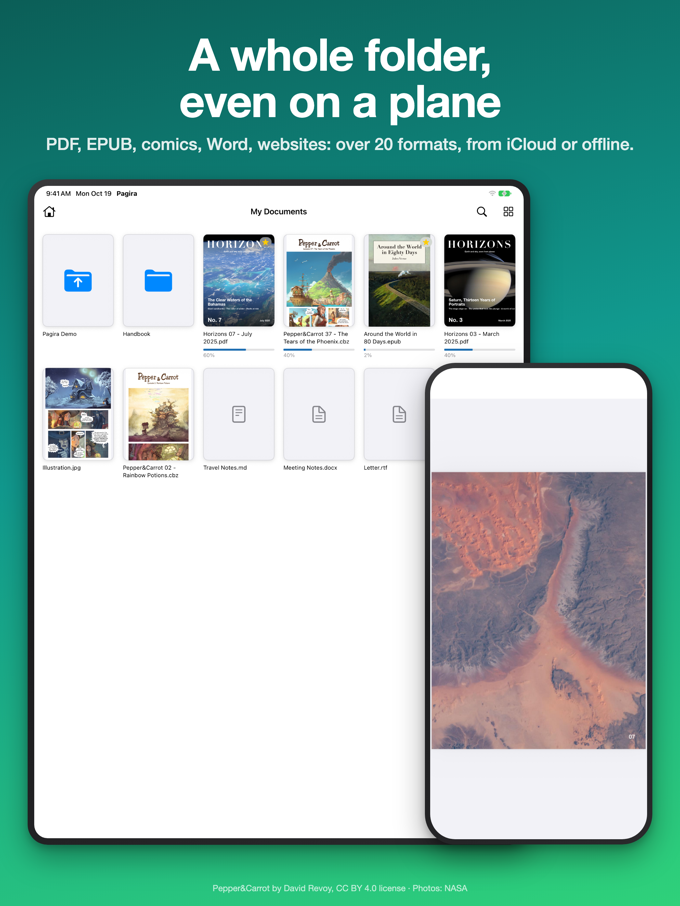
Pagira home screen on iPad with recent documents and PDFs

Open a complete HTML folder, with all its linked pages

Open the whole folder and Pagira shows it exactly as it was designed: the layout, images, styles and linked pages all work, even the interactive parts. Everything stays on your device.

  • Whole folders, sub-pages included
  • Looks and works like it does on a computer
  • Even rich, interactive pages
Learn more
Pagira PDF reader on iPad

Built-in PDF reader

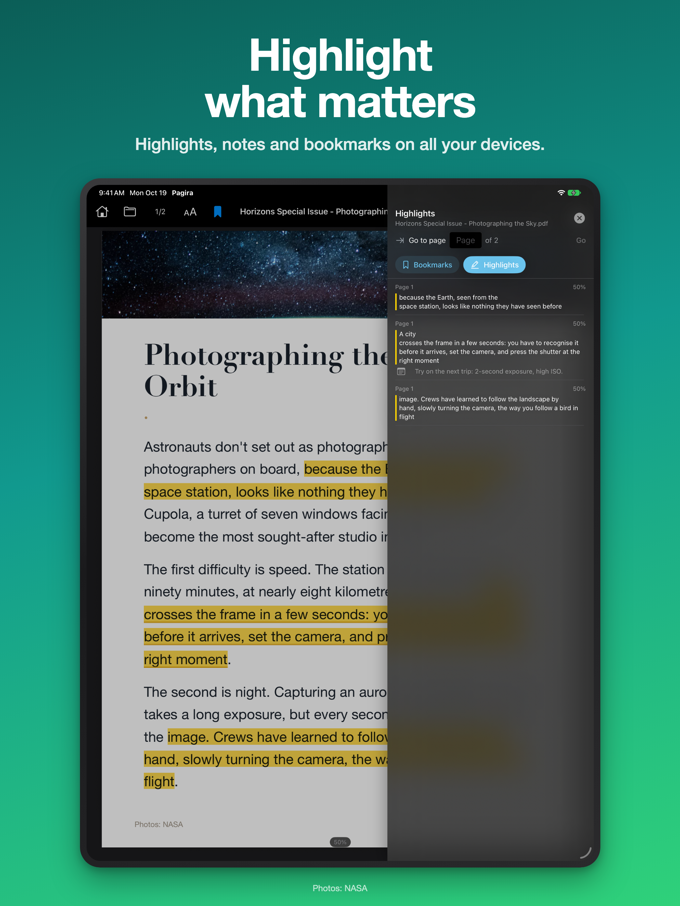
Open your PDFs in a clean, fast reader: smooth scrolling, pinch to zoom, and easy page-to-page navigation. Tap a PDF link inside a web page and it opens right there - swipe back to return.

  • Fast, built-in PDF reader
  • Scroll, zoom and multi-page
  • PDF links inside a page open inline
Learn more
Pagira reading offline on iPad with no connection

Stream from iCloud, or save for offline

Items in iCloud Drive stream on demand - assets download as you read, like Netflix, with no upfront wait. Heading off the grid? Download a permanent offline copy: resumable, non-destructive, and visible in Files.

  • On-demand iCloud streaming
  • Download for offline, resumable
  • Offline banner for what's available
Learn more
Pagira reading list panel on iPad

A reading list, Safari-style

Save the current page or PDF to a side panel. Each item is saved as a complete snapshot - the full page or a PDF copy - so it stays available offline. Filter by read or unread, mark items, and remove what you're done with.

  • Complete page snapshots
  • Always available offline
  • Read / unread filter
Learn more
Pagira history with recent items on iPad

Open from anywhere, pick up where you left off

Use "Open with Pagira" from Files or any app to open a website or a PDF. A navigation bar gives you back, forward, reload and the title of the current page. Recent items are remembered, and Pagira can reopen your last one on launch.

  • "Open with Pagira" from Files
  • Back / forward / reload + page title
  • Recents and reopen on launch
Learn more

And more...

Small touches that keep reading effortless, document after document.

An HTML folder or a single page

Open a whole site folder, or just a single HTML page or PDF - whatever you have on hand.

Drop sites via Files

Pagira's folder shows up in the Files app, so you can copy sites in from Finder or Files directly.

Inline PDF links

A link to a PDF inside an HTML page opens in place - swipe back to return to the page.

Recent items

Recently opened sites and PDFs are remembered for one-tap access.

Offline aware

An offline banner makes it clear which items you can still open without a connection.

iPhone & iPad

One app designed to feel at home on both iPhone and iPad.

Reopen on launch

Turn on a setting to jump straight back into your last item every time you open Pagira.

Privacy first

Everything runs locally on your device. Your files are never uploaded or shared.

Built for real-world documents

From a single HTML page to documentation running into thousands, with their styles, images and interactive parts.

Pagira showing a rich, interactive page on iPad
Complete HTML folders Layouts & styles Images & media Interactive pages PDF documents Offline reading iCloud Drive iPhone & iPad

Who Pagira is for

Some documents are not a single file: they are an HTML folder, with pages that link to each other, images and a layout. On a computer a double click is enough. On iPhone and iPad, nothing opens properly. Pagira is built for those documents.

Students and teachers

Courses exported from Moodle or Blackboard, lecture notes, past papers, e-learning modules. One folder per subject, opening exactly as it was designed, on the train or in a lecture hall with no signal.

Workplace training

SCORM modules, onboarding paths, safety and quality training. An e-learning module is an HTML folder with an entry page: Pagira opens it as is, with no platform and no account.

Healthcare and medical staff

Ward protocols, best-practice guidelines, recommendations, continuing education material. Documents you read at the bedside or in the on-call room, where the hospital network stops.

Mechanics and maintenance

Automotive service manuals, manufacturer procedures, wiring diagrams, parts catalogues. Workshop documentation almost always arrives as a folder with its own tree: Pagira keeps it navigable, on the iPad sitting on the bench.

Aviation, marine and transport

Flight manuals, checklists, manufacturer documentation, ship's papers. The iPad is already the reference tool on board, the documentation still has to open in full and with no signal.

Technical and industrial documentation

Operating instructions, maintenance manuals, product sheets, supplier catalogues. Hundreds of pages linked together, readable on site or at a customer's, with no connection.

Law, standards and compliance

Statutes and articles of law, collective agreements, ISO and national standards, case law. Corpora distributed to be read offline, with their cross-references actually working.

Finance and management

Annual reports, audit reports, board packs, minutes exported from an intranet. Received by email or dropped in iCloud, opened in two taps before the meeting.

The common thread: a folder, pages that answer each other, and the wish to read it on a comfortable screen without depending on the network. Whether it is a ten-thousand-page corpus or an appliance manual downloaded the day before.

Testimonials

Excellent

Superb app. I had been looking for a long time for a way to read the HTML course material my university provides, and to read it offline too. The pages display properly, with their layout and images intact. Thank you 👍

The story behind Pagira

“I bought a bundle of HTML and PDF magazines, no iPad app displayed them properly, so I solved it myself.”

I bought a batch of old magazines, delivered as HTML and PDF. One folder per issue, with its stylesheets, its images, its scripts and its subfolders. On a Mac, a double click was enough.

On an iPad, nothing worked. The reader apps showed raw HTML, with no layout and no images, when they did not simply lose the links between pages. The only reliable method was to run a local web server, which makes no sense when you want to read in an armchair.

That is what I wrote Pagira for: opening a complete site folder on iPhone and iPad, the way it was designed, offline, with no server and without sending anything anywhere.

Jimmy, developer of Pagira

Simple pricing

One purchase, yours forever. No subscription.

Pagira

Full access to every feature

Now on iPhone & iPad
$4.99

One-time purchase

  • Universal app for iPhone & iPad
  • Full local website rendering
  • Native PDF reader
  • iCloud streaming & offline downloads
  • Reading list with offline snapshots
  • All future updates included
Download on the App Store

Designed for iPhone and iPad.

Why prestApps?

There is no faceless studio behind Pagira. Three things you can check for yourself.

A developer you can name

Jimmy, independent developer in Paris. 25 years building software, more than ten of them on Apple platforms. A sole trader registered in France, with the address and registration number published in the legal notice.

Your files stay with you

No analytics SDK, no crash reporter, no telemetry, no account to create. Pagira opens no connection to a prestApps server, because none exists: your documents never leave your iPhone or your iPad.

Support that answers

Your email reaches the developer directly, not a ticket queue. Bugs go to the top of the list, and requested features usually ship within days.