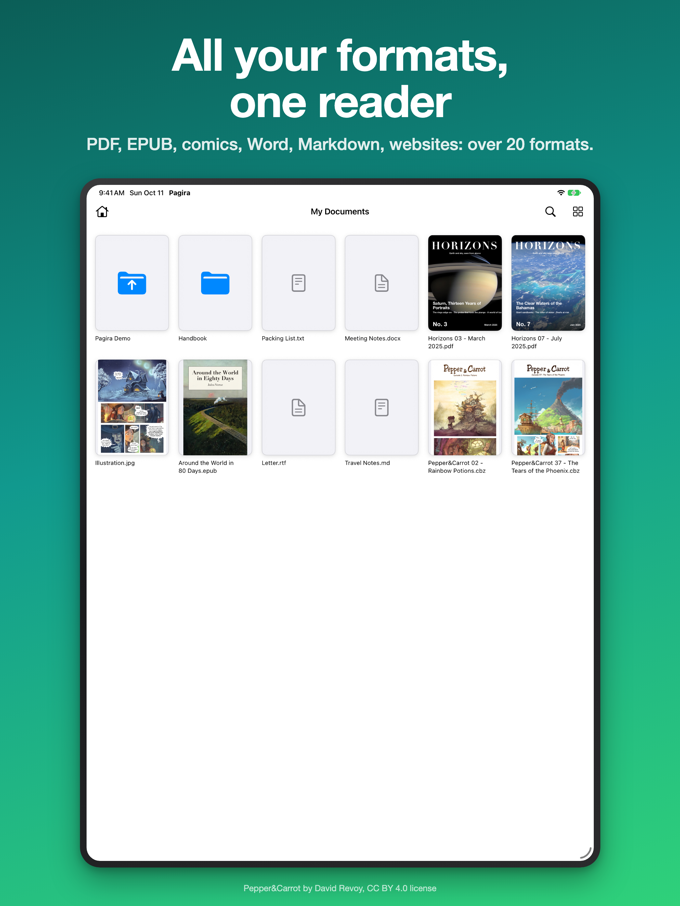
A list of file names tells you nothing. 2025-03.pdf, 2025-04.pdf, 2025-05.pdf: that is the issue number, not what is inside. You open, you look, you close, you start again.
So Pagira displays your folders as a grid of thumbnails. Every PDF shows its first page.
The cover does the work
A journal, a report, an instruction leaflet or a magazine issue is recognised from its first page far faster than from its file name. The thumbnail gives you back what the list had taken away: you spot the right document without opening it.
That is especially true of older collections, where the file names were given by somebody else, a long time ago, following a logic nobody remembers.
Books and comics too
An EPUB book shows its cover, a comic its first page. In a folder mixing PDFs, books, comics and Word documents, every file is recognisable at a glance.
Subfolders stay in the grid
A documentation set is nearly always organised: one folder per year, per model, per department. Subfolders appear among the thumbnails, in their place, and you move down the tree without changing screen or losing the thread.
The folder keeps its name
The title at the top of the screen is that of the folder you are browsing. On a deep tree, that is what tells you where you are, and it is often the only thing you need in order to know you have taken the wrong branch.
Thumbnails or list, as you prefer
The grid is not imposed. A button in the toolbar switches between thumbnails and the list view: the grid to recognise, the list to find a precise name or to scan a lot of items at once.
And it is all already there
The previews are generated on the device, from your files. Nothing is sent anywhere, nothing has to be prepared in advance, and it works just as well on a folder downloaded for offline reading as on one streamed from iCloud Drive.