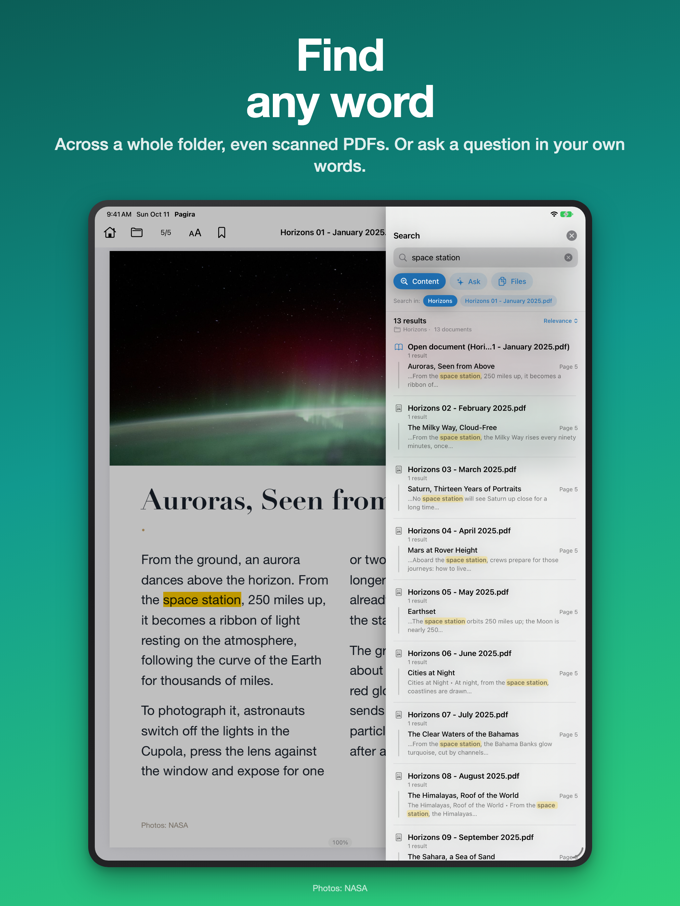
Local documentation is almost never one document. It is a folder: a service manual running to thousands of pages, a course exported chapter by chapter, a parts catalogue with its appendices in PDF. You know the sentence you are after is in there. You no longer know which file.
Until now the only option was to open the documents one by one. Pagira's search looks through the whole folder at once.
Web pages and PDFs, together
The search draws no distinction between an HTML page and a PDF: both sit in the same folder, both get read. A procedure described in a page and its diagram attached as a PDF come back side by side, in the same list of results. The Word, Markdown, RTF and text documents in the folder are searched too.
Results grouped by document
A common word can appear on a hundred pages. A list of a hundred lines tells you nothing. So Pagira groups results by document, with the number of pages concerned: you see where it is first, and expand afterwards.
In a PDF, each result carries the name of its section, taken from the document's table of contents: you know which chapter you are landing in before you open it.
The document you are currently reading is always brought to the top of the results. It is almost always the one you meant.
Opening a result takes you to the right page
Tap a result and the app jumps straight to the page concerned, your words highlighted. In a web page as in a PDF, with no need to search a second time once the document is open.
A strict search, and that is deliberate
Pagira returns the pages that contain all the words you typed. Not pages containing one word in three, not pages an algorithm judged close enough. It looks for what you typed and nothing else: when you are checking a torque figure or a dosage, the near-enough result is worth nothing.
If you cannot remember the exact words used in the document, the Ask tab takes a question in everyday language.
Choosing where to search
A visible selector lets you narrow the search: the whole folder, the current subfolder, or just the document you have open. On a corpus mixing several manuals, that is what stops you finding the right paragraph in the wrong vehicle.
Finding a file by its name
Sometimes it is the document itself you are looking for. The Files tab finds it by its name, across the whole folder and its subfolders, from the first few letters you type.
Scanned PDFs too
A scanned PDF is only an image: it contains no word to search for. Pagira offers "Recognise text" to read it on the device and bring it into the search like any other document. It is on demand, never automatic, and it can continue in the background while the device is plugged in.
On the device, offline
The whole search runs on your iPhone or iPad. No account, no server, no data sent: your keywords and the content of your documents do not leave the device. So it works in a workshop with no signal, on a plane, or in a hospital ward - exactly where offline documentation is good for something.